OPTIGA™ Authenticate NBT Host Library for Java: User guide
The OPTIGA™ Authenticate NBT Host Library for Java offers an extensive API to interact with the OPTIGA™ Authenticate NBT and to utilize its full functionality. The host library is mainly intended to be used in Java/Android applications interfacing to the OPTIGA™ Authenticate NBT via NFC (for example: mobile phones or NFC readers).
Scope and purpose
This guide describes the features and functionality of the OPTIGA™ Authenticate NBT Host Library for Java including architecture overviews of core libraries and basic descriptions. It also conveys the basic procedure to integrate the provided host library into existing Java and Android applications.
Intended audience
This guide is primarily intended for:
Android application developers who target to integrate the OPTIGA™ Authenticate NBT Host Library for Java into Android mobile phone apps
Java application developers who target to integrate the OPTIGA™ Authenticate NBT Host Library for Java into desktop applications using NFC readers
Key features
Sends command APDUs (C-APDU) and receives response APDUs (R-APDU) from the OPTIGA™ Authenticate NBT
Configuration of OPTIGA™ Authenticate NBT via its configurator application
Personalization and operational commands to support simplified interaction with OPTIGA™ Authenticate NBT
NDEF host library that enables the host application to build, encode, and decode NDEF records and messages
NDEF host library that supports “NFC Forum well known type” and “NFC Forum external type”
NDEF host library that provides brand protection supported NDEF records
Host library architecture
This host library provides high-level command abstractions to communicate with the OPTIGA™ Authenticate NBT. It includes multiple sub-libraries in its package. The core libraries are designed to be platform-independent and they depend on a number of other libraries to provide their full functionality.
Core libraries
The OPTIGA™ Authenticate NBT Host Library for Java contains three core libraries to interact with the OPTIGA™ Authenticate NBT.
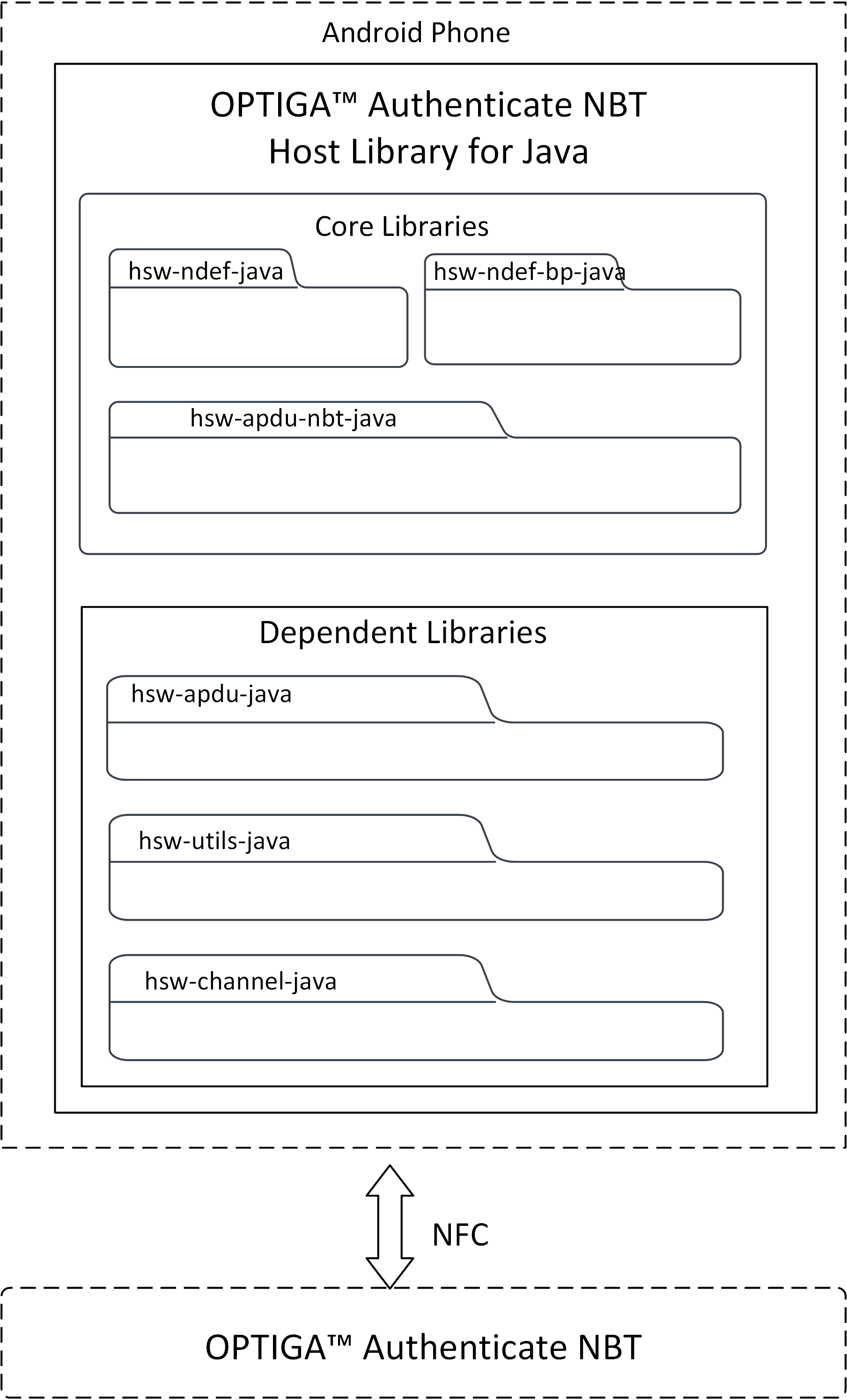
Fig. 10 Software architecture of the OPTIGA™ Authenticate NBT Host Library for Java.
hsw-apdu-nbt-java
This host library allows the application to send C-APDUs to the OPTIGA™ Authenticate NBT and receive R-APDUs from the OPTIGA™ Authenticate NBT. This library can be used with communication channels such as NFC, PCSC.
hsw-ndef-java
The NFC Data Exchange Format (NDEF) specification by NFC Forum defines a common data format to exchange information between NFC Forum devices. This library provides support to build and parse the NDEF messages, with support for common NDEF record type definitions. This library is extensible for an addition of new record type definitions.
hsw-ndef-bp-java
The NFC brand protection record library is an extension to the NDEF library to create and parse NFC brand protection records for the OPTIGA™ Authenticate NBT. This extended library includes NDEF records and parsers to provide the core brand protection functionality of the OPTIGA™ Authenticate NBT. Brand protection specific encoding and decoding are handled by the library itself. But this library depends on the hsw-ndef-java library for registering its records and for further NDEF record and message manipulations.
Dependent libraries
The core libraries are dependent on several other libraries. A detailed description of these dependent libraries is provided below.
Dependent libraries |
Description |
|---|---|
This APDU library helps in building the APDU command bytes and parses the APDU response bytes according to the ISO/IEC 7816-4 specification. |
|
This dependent library provides the communication protocol interface for the OPTIGA™ Authenticate NBT APDU core library. This protocol provides interfaces such as initialize, transceive, and terminate to communicate with the OPTIGA™ Authenticate NBT. |
|
This dependent library provides the utility methods such as byte conversions, string conversions, and bit operations. |
Directory structure
The directory structure of the OPTIGA™ Authenticate NBT Host Library for Java follows the pitchfork layout including core and dependent libraries.
hsw-nbt-java
|-- LICENSES/                       # Includes licenses used by the host library
|-- docs/                           # Includes user guide, images and the generated API reference
|-- gradle/                         # Includes Gradle wrapper configuration files
|-- library/                        # Includes the core and dependent libraries
|   |-- hsw-apdu-java/              # Dependent library
|   |-- hsw-apdu-nbt-java/          # Core library
|   |-- hsw-channel-java/           # Dependent library
|   |-- hsw-ndef-bp-java/           # Core library
|   |-- hsw-ndef-java/              # Core library
|   `-- hsw-utils-java/             # Dependent library
|-- .gitignore                      # Host library-specific gitignore file
|-- README.md                       # Overview of the OPTIGA™ Authenticate NBT Host Library for Java
|-- gradlew                         # Gradle wrapper Script
|-- gradlew.bat                     # Gradle wrapper Start up script for windows
`-- settings.gradle                 # Gradle project settings file
Gradle build system
The OPTIGA™ Authenticate NBT Host Library for Java is integrated with Gradle to ensure a smooth and consistent workflow for building Java and Android applications. The host library supports the following tools with the mentioned versions only:
Gradle version 8.3 and higherJDK version 1.8 and higher
Build as library
The OPTIGA™ Authenticate NBT Host Library for Java uses gradle to build.
# Build the code
.\gradlew build
Documentation
The OPTIGA™ Authenticate NBT Host Library for Java API documentation is available in “docs/” folder. For more information on the API, build Javadoc documentation. The Javadoc tool is installed as part of the Java Development Kit installation.
.\gradlew javadoc
The documentation will be put in a directory \build\docs\javadoc.
Integrating into an existing project
Using Gradle as a build tool, integrating the host library into an existing project is straightforward. Here is how you can add the library as a dependency into a Java project:
Gradle based project
Integrating into a Gradle-based project (for example: Android Studio project):
Place the OPTIGA™ Authenticate NBT Host Library for Java into the folder of your existing application (for example: into the libs/ folder)
Open existing application project’s settings.gradle file
Add the library path of all the needed modules in the settings.gradle file (make sure to use the correct path) for example:
include('com.infineon.hsw.ndef')
project(':com.infineon.hsw.ndef').projectDir = new File('app/libs/hsw-ndef-java')
Open existing application project’s build.gradle file
Add library modules as a dependency, for example:
dependencies {
    implementation project(':com.infineon.hsw.ndef')
}
Save the build.gradle file and sync your gradle project
Once the library is successfully included, start using it in Java or Android application code by importing the necessary classes from library
import com.infineon.hsw.nbt.ndef.records.RecordEncoder;
Eclipse IDE project
To integrate OPTIGA™ Authenticate NBT Host Library for Java into Java or Android existing application in Eclipse IDE, follow the steps below.
Open Eclipse IDE. Make sure that JDK is installed and configured in the Eclipse IDE.
Open the application project
Right click on the project
Select Build Path
Click on Configure Build Path
Click on Libraries and select Add External JARs
Select the jar file from the file explorer
Click Apply and Close
Then import the package name in source code and access the API
import com.infineon.hsw.nbt.ndef.records.RecordDecoder;
Library interaction
An example interaction between the core libraries is explained below with a use case - Update URI data in an application file of the OPTIGA™ Authenticate NBT. The hsw-ndef-java library is used to prepare a URI record and update it on the file system of the OPTIGA™ Authenticate NBT using the hsw-apdu-nbt-java library.
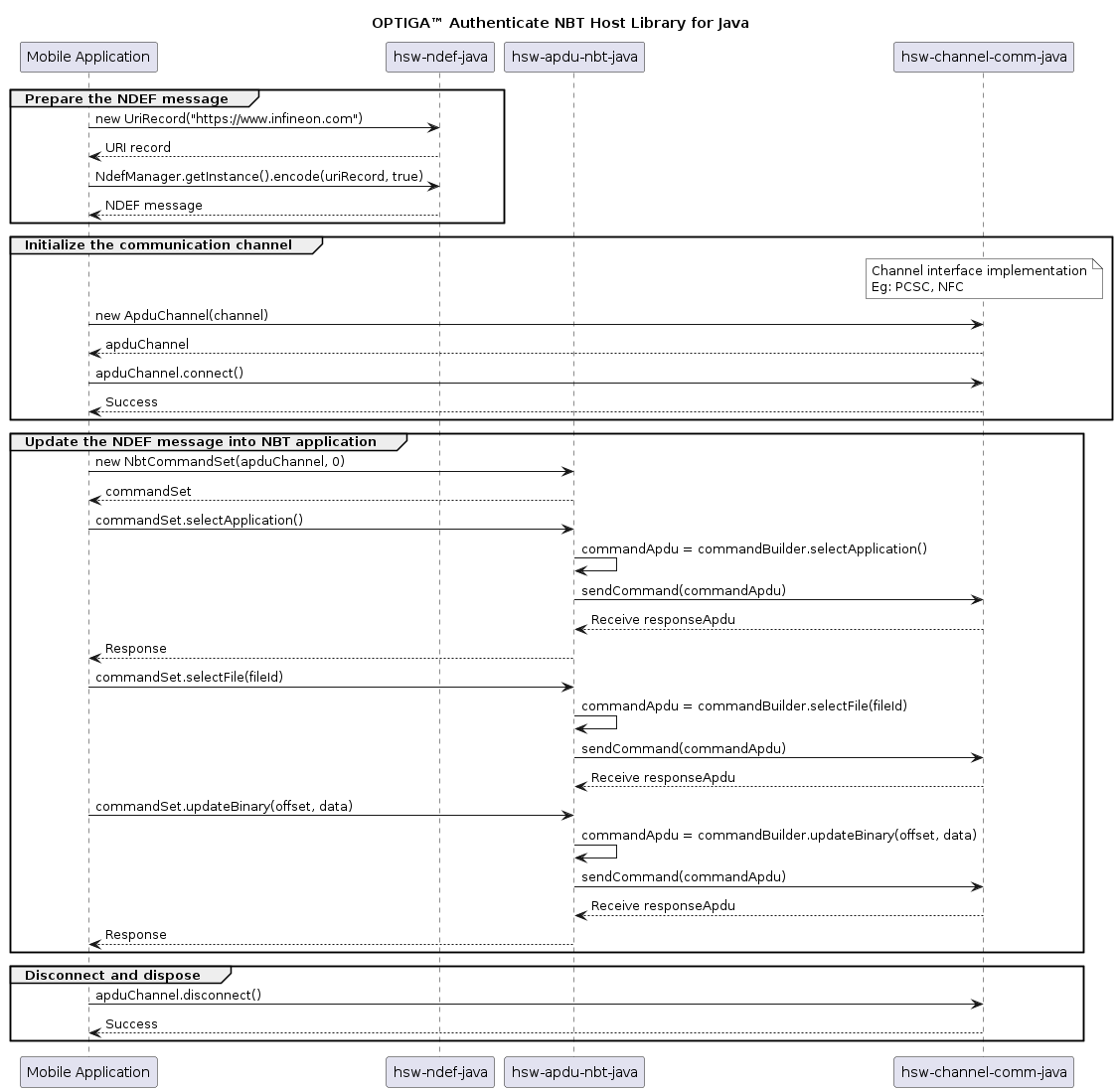
Fig. 11 Interaction between the components of the OPTIGA™ Authenticate NBT Host Library for Swift.
Library usage
The usage of the host library’s API to update a URI record in the OPTIGA™ Authenticate NBT application file is illustrated below.
Include the required headers from the OPTIGA™ Authenticate NBT Host Library for Java
// NDEF headers
import com.infineon.hsw.ndef.IfxNdefMessage;
import com.infineon.hsw.ndef.NdefManager;
import com.infineon.hsw.ndef.records.rtd.UriRecord;
import com.infineon.hsw.ndef.records.rtd.UriRecord.UriIdentifier;

// APDU headers
import com.infineon.hsw.apdu.nbt.NbtCommandSet;
import com.infineon.hsw.apdu.nbt.NbtApduResponse;

// communication protocol headers
import com.infineon.hsw.apdu.ApduChannel;
import com.infineon.hsw.apdu.ApduResponse;
Create a communication channel to interact with the OPTIGA™ Authenticate NBT
// Initialize the APDU channel with communication channel NFC
ApduChannel apduChannel = new ApduChannel(channel);

// Connect to the OPTIGA™ Authenticate NBT
apduChannel.connect();
Update URI data in the application file of the OPTIGA™ Authenticate NBT with file ID 0xE104
// Build URI record
UriRecord uriRecord = new UriRecord(UriIdentifier.URI_HTTPS_WWW, "infineon.com");

// Encode the records into an NDEF message
IfxNdefMessage message = new IfxNdefMessage(uriRecord);
byte[] uriMessageBytes = NdefManager.getInstance().encode(message, true);

// Create an instance of the NBT APDU command set
NbtCommandSet commandSet = new NbtCommandSet(apduChannel, 0);

NbtApduResponse apduResponse;
apduResponse = commandSet.selectApplication();
apduResponse.checkStatus(); // Checks SW success, else throws an exception
apduResponse.getSW();   // Returns response status word

apduResponse = commandSet.selectFile(0xE104);
apduResponse.checkStatus();

byte expected_len = (byte) 0x10;
short offset = (short) 0x0000;
apduResponse = commandSet.updateBinary(offset, uriMessageBytes);
apduResponse.checkStatus();
apduResponse.getData(); // Returns response data bytes
References
Infineon Technologies AG: OPTIGA™ Authenticate NBT, Extended Datasheet