Operation
This section describes the system composition for the evaluation of the OPTIGA™ Authenticate NBT with the offline brand protection applications (during operation). It provides the design details and the core methodology used in the example applications for this use case.
Before the NBT can be used for operation it needs to be personalized for its use case-specific functionality, see Personalization for details. A dedicated mobile phone app uses the device’s certificate and its authentication function to verify the authenticity of the device.
System architecture
For offline brand protection, the OPTIGA™ Authenticate NBT provides a certificate in its NDEF message. Together with the authenticate function of the NBT, the mobile phone app can verify the authenticity of the device. The used hardware and software components for this use case will be covered in detail below.
Hardware
The main configuration for this use case is the NFC-only tag setup. Even though the NBT can be connected to a host MCU via I2C, this is not required for the operation of this use case. The mobile phone can communicate with the OPTIGA™ Authenticate NBT via the NFC interface and access the NDEF message holding the device unique certificate and the public key, which is used to execute the offline brand protection use case.
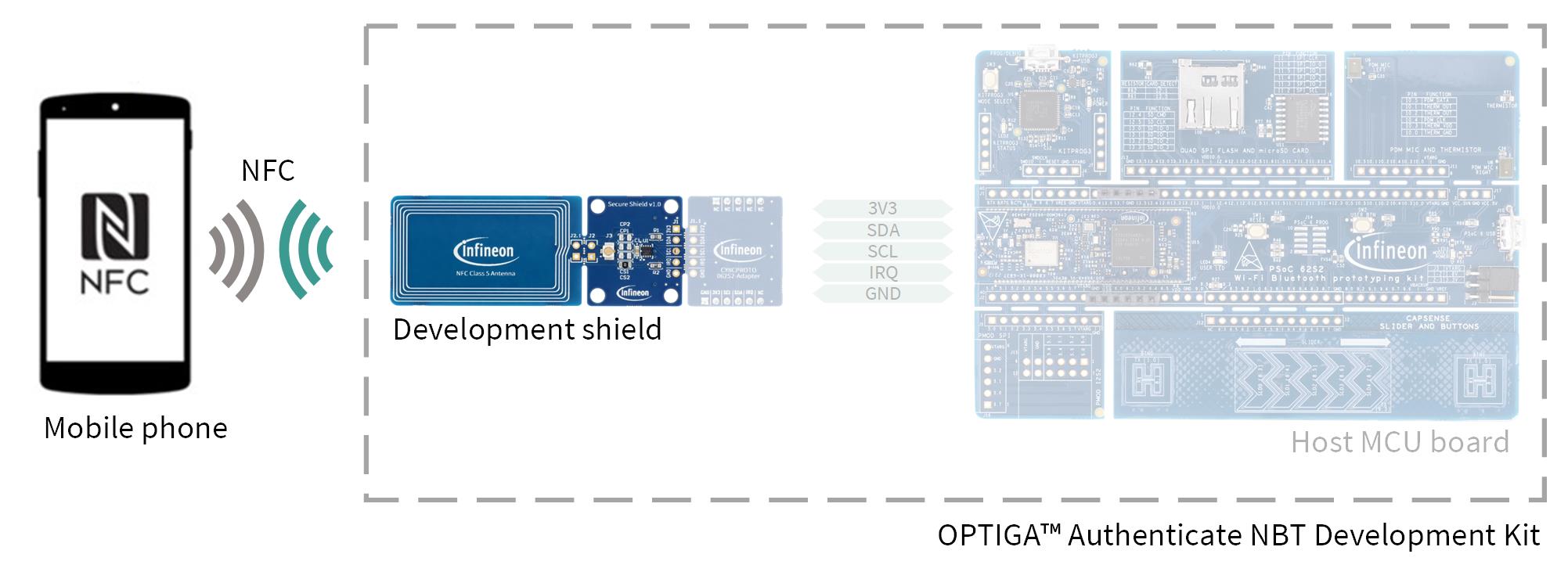
Fig. 44 Hardware components for operation.
Software
The involved software divides into the mobile phone app (Android or iOS) and the application(s) running on the OPTIGA™ Authenticate NBT. The following figure shows an overview of the involved software components:
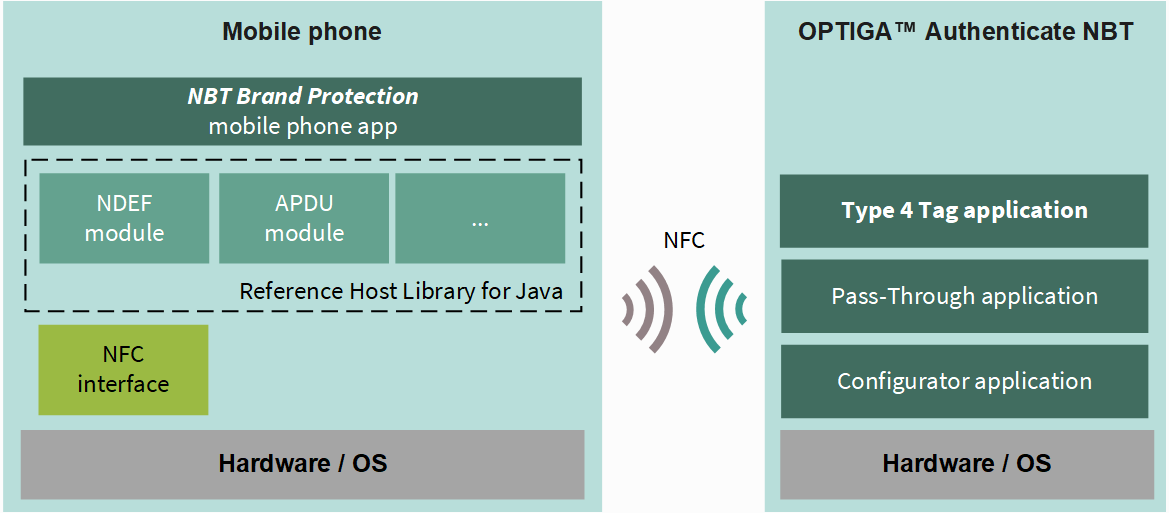
Fig. 45 Software architecture of the included applications for the operational use case.
The mobile phone applications are provided as source code via GitHub (see Software requirements). They are considered off-chip software, which means they can be modified and recompiled.
In contrast, the NBT applications are considered on-chip software, pre-flashed on the device and not alterable. The operational flow utilizes only the Type 4 Tag application of the OPTIGA™ Authenticate NBT’s on-chip applications. Refer to the extended datasheet for more information about the on-chip applications.
Operational flow
The example implementation of this use case involves thee authentication of the NBT using a mobile phone. The flow from reading the COTT value from the NBT to verifying it on the webserver is described below.
The use case makes use of the device’s brand protection signing key (BSK) and the corresponding certificate (stored in its NDEF message) to verify the authenticity of the device.
Authenticity verification
Using public-key cryptography and public-key infrastructure (PKI), the mobile phone application can validate the OPTIGA™ Authenticate NBT. The PKI allows the mobile phone to perform local verification using the trusted certification authority (CA) certificate. The high-level flow of the use case is as follows:
The end user launches the NBT Brand Protection application on the mobile phone and taps the NFC tag.
The mobile phone app reads the device certificate from the NDEF file.
The mobile phone validates the device certificate using the issuer’s CA (manufacturing certificate or dummy manufacturing certificate).
The mobile phone sends a challenge to the NBT device (
AUTHENTICATE TAGcommand). The device returns the calculated signature using the device’s private key (BSK).The app then verifies the authenticity of the device using the public key from the device certificate, the challenge, and the returned signature (ECDSA-with-SHA256).
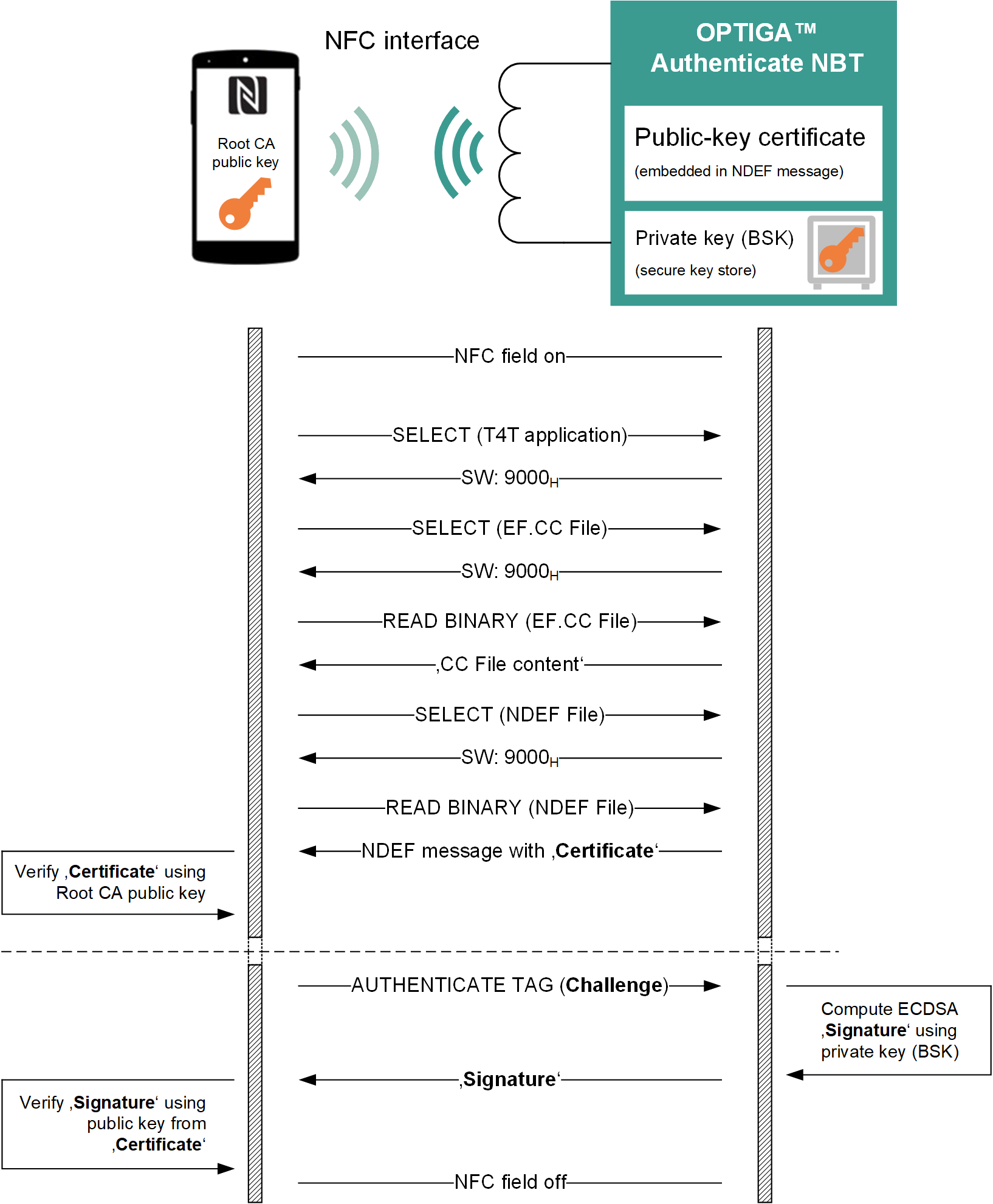
Fig. 46 Verification of the COTT value in the NDEF URI record via mobile phone browser and webserver.
Design details
Describes the core design principles used for the implementation of the applications to demonstrate this use case. Additionally, cross-application definitions are stated here.
Authenticate tag
The AUTHENTICATE TAG command is used to verify the authenticity of the
OPTIGA™ Authenticate NBT device. The command is sent by the mobile phone app
to the NBT device via NFC.
The command includes a challenge (1-255 bytes), which is a random byte array generated by the mobile phone app (8 byte). The response to that command contains the ECDSA signature computed using SHA-256. This signature is returned as an DER-encoded ASN.1 sequence of two ASN.1 integers. The mobile phone app can verify the authenticity of the device by validating the signature using the public key from the device certificate, the challenge, and the returned signature.
For more details about the AUTHENTICATE TAG command, refer to the extended
datasheet.
Default keys and certificates
An overview of the available keys and certificates and the ability to download them is provided in Default keys and certificates.
Device key and certificate:
A unique EC P-256 public/private key pair is generated for each OPTIGA™ Authenticate NBT device during the productive flow. The private key is stored in the device’s secure key storage as brand protection signing key (BSK). The corresponding public key is stated in the device certificate (X.509v3 DER-encoded), embedded in the device’s default NDEF message. This device certificate is signed with the private key (EC P-384) from Infineon’s manufacturing certificate authority (CA). The private key (BSK) as well as the device certificate are stored in the OPTIGA™ Authenticate NBT device during the manufacturing process.
Manufacturing key and certificate:
The Infineon manufacturing certificate authority (CA) holds public/private key pair for signing the device certificates during manufactoring. The corresponding public key is stated in the associated manufacturing certificate (X.509v3 DER-encoded). This manufacturing certificate is included in the brand protection mobile phone apps. The private key is used while issuing device certificates to calculate the signature. The manufacturing certificate is signed with the private key (EC P-512) from Infineon’s root certificate authority (CA). The private key is securely stored by Infineon, while the manufacturing certificate is shared publicly (see Default keys and certificates).
Root key and certificate:
The Infineon root CA holds public/private key pair for signing the manufactoring certificates. The private key is used while issuing manufacturing certificates to calculate the signature. The root certificate is signed with its own private key (EC P-512). The private key is securely stored by Infineon, while the root certificate is shared publicly (see Default keys and certificates).
Dummy keys and certificates
If the device is re-personalized for this use case with the perso mobile app, a dummy key (BSK) and dummy device certificate is placed on the device. The dummy device certificate is subject to a dummy root of trust, which consists of a dummy manufacturing certificate and a dummy root certificate. For easier understanding, the involved dummy keys and certificates are all shared publicly.
An overview of the available dummy keys and certificates and where they can be downloaded is given in Dummy keys and certificates.
Caution
This dummy keys are shared with the public only intended for demonstration purposes. They shall not be used in productive environments.
Dummy device key and certificate
While resetting the device using the NBT Personalization app, the device’s initial BSK key and the corresponding device certificate are exchanged by a pre-generated dummy key and certificate. This step is performed since the initial private/public key cannot be restored after it was changed (e.g., by deleting the NDEF message). Thus, the app uses a predefined dummy private/public key pair to replace the device’s BSK key and certificate. The dummy device certificate is signed by a dummy manufacturing CA of Infineon.
Dummy manufacturing key and certificate
The used dummy manufacturing certificate is included in the brand protection mobile phone apps. The corresponding public key is stated in that certificate. The private key was used to sign the dummy device certificate. Thus, the dummy manufacturing certificate can be used to demonstrate the verification of the dummy device certificate.
Dummy root key and certificate
The used dummy root certificate is included in the brand protection mobile phone apps. The corresponding public key is stated in that certificate. The private key was used to sign the dummy manufacturing certificate. Thus, the dummy root certificate can be used to demonstrate the verification of the dummy manufacturing certificate.