Operation
This section describes the system composition for the evaluation of the OPTIGA™ Authenticate NBT with the online brand protection applications (during operation). It provides the design details and the core methodology used in the example applications for this use case.
Before the NBT can be used for operation it needs to be personalized for its use case-specific functionality, see Personalization for details.
The use case utilizes the device’s functionality to embed cryptographic one-time tokens (COTT) into the URI record contained in its NDEF message. After opening this URL in the mobile phone’s browser, a Cloud Authentication Service can then verify the authenticity of the device.
System architecture
In the online brand protection mode, the OPTIGA™ Authenticate NBT updates its cryptographic one-time tokens (COTT) embedded in its NDEF message every time the file is selected. The mobile phone uses this token and transfers it to a webserver, which holds the key to verify the COTT and to determine the authenticity of the device. The used hardware and software components for this use case will be covered in detail below.
Hardware
The main configuration for this use case is the NFC-only tag setup. Even though the NBT can be connected to a host MCU via I2C, this is not required for the operation of this use case. The NFC-enabled mobile phone is used to retrieve data from the OPTIGA™ Authenticate NBT. Additionally, the phone can connect to a cloud authentication service which executes the verification sequence.
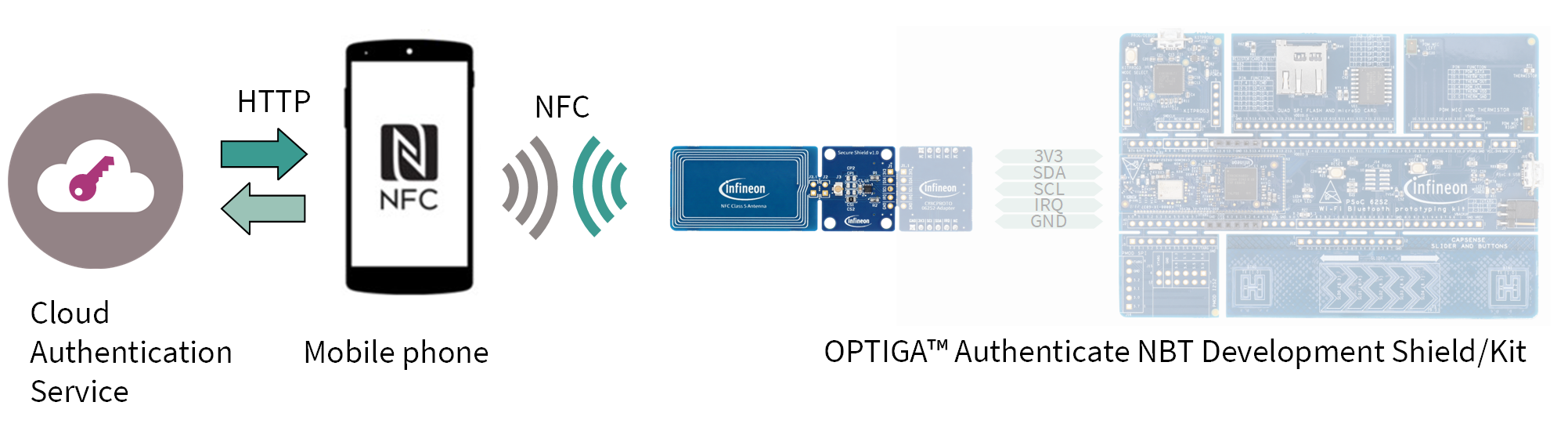
Fig. 31 Hardware components for operation.
Software
The involved software divides into the webserver implementation and the application(s) executed on the OPTIGA™ Authenticate NBT. For this use case, no dedicated mobile phone app is required. The phone’s native NFC implementation automatically opens its browser application using the URL pointing to the webservice. The following figure shows an overview of the involved software components.
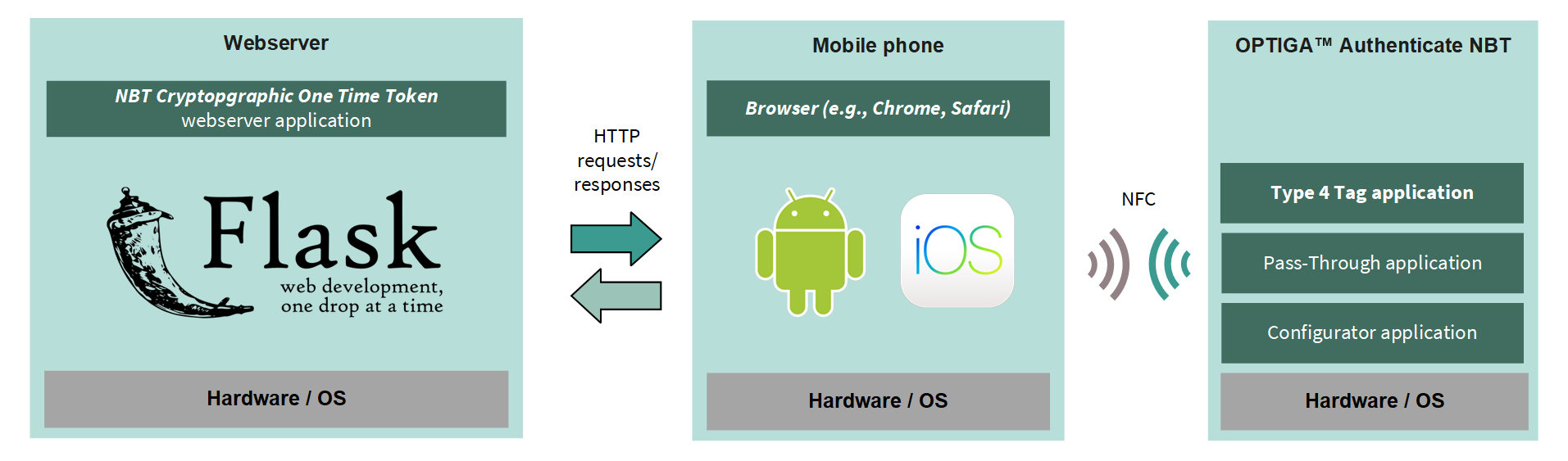
Fig. 32 Software architecture of the included applications for the operational use case.
The webserver application is provided as source code via GitHub (see Software requirements). It is considered off-chip software, which means it can be modified and recompiled.
In contrast, the NBT applications are considered on-chip software, pre-flashed on the device and not alterable. The operational flow utilizes only the Type 4 Tag application of the OPTIGA™ Authenticate NBT’s on-chip applications. Refer to the extended datasheet for more information about the on-chip applications.
Operational flow
The flow from reading the COTT value from the OPTIGA™ Authenticate NBT to the verification on the webserver is described below.
Authenticity verification
If the NBT is personalized for this use case, it holds the webserver’s URL in its NDEF message and contains the COTT placeholder string. The COTT value is (re)generated by the NBT every time the NDEF file is selected. The new COTT value is then appended to the URL, replacing the placeholder string. The mobile phone reads this URL and opens it in the browser. The webserver can then verify the URL’s COTT parameter and determine the authenticity of the device. The following figure shows the flow of the COTT verification:
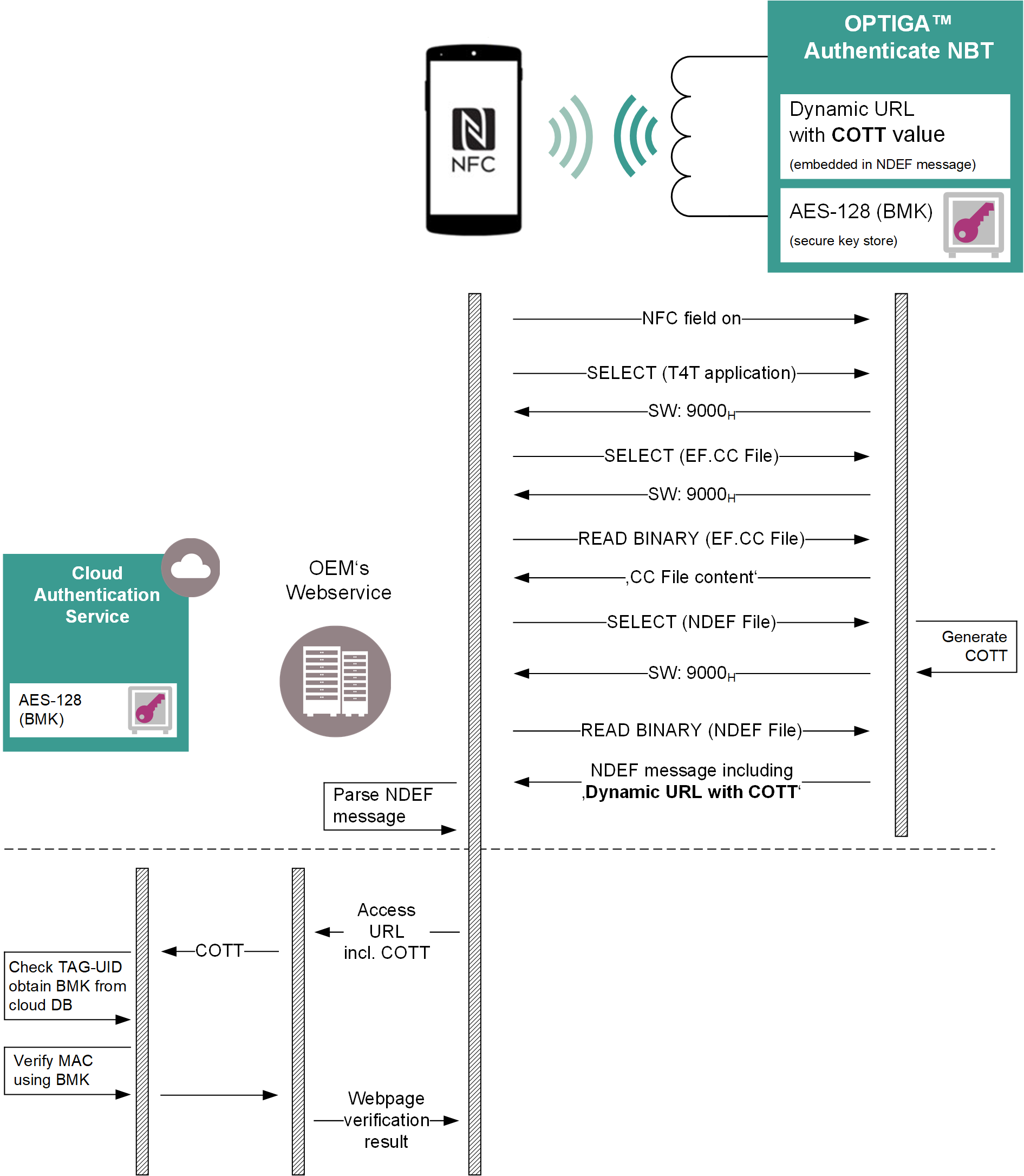
Fig. 33 Verification of the COTT value in the NDEF URI record via mobile phone browser and webserver.
Design details
Following sections are describing the core design principles used for the implementation of the applications to demonstrate the use case. Additionally, cross-application definitions are stated here.
COTT URI record composition
Every time the NDEF message file is selected, a new COTT value is generated. To calculate the COTT value, the NBT uses the following data/parameters:
Field |
Length |
Description |
|---|---|---|
Header |
2 byte |
Static header data to indicate COTT |
UID |
7 byte |
UID of the OPTIGA™ Authenticate NBT |
Random number |
8 byte |
Random number generated by the NBT |
BMK |
16 byte |
AES-128 Brand Protection MAC’ing key (BMK) |
BMK
16 byte AES-128 key, used to generate the AES-128-CMAC.
Provisioned to the NBT at delivery, can be updated during personalization.
The default (dummy) value for demo purposes is:
BMK = 373f5060409ba014b69a627622f23b59
MAC
AES-128-CMAC algorithm, using the BMK
CMAC(Header || UID || Random number)CMAC(0001 05820c18816300 73ddf139bb015a5c)MAC = f1b17e1585eb2e33c2155101844725ea
COTT
base64(Header || UID || Random number || MAC)base64(0001 05820c18816300 73ddf139bb015a5c f1b17e1585eb2e33c2155101844725ea)COTT = AAEFggwYgWMAc93xObsBWlzxsX4VhesuM8IVUQGERyXq
URI
This URI is embedded in the NDEF message of the OPTIGA™ Authenticate NBT.
[SERVER URL]/?COTT=[COTT]URI = https://optiga-nbt-cott-service.infineon.com/?cott=AAEFggwYgWMAc93xObsBWlzxsX4VhesuM8IVUQGERyXq
Click here to open that example URI in your browser.
COTT verification steps
In order to verify the COTT value, the webserver needs to perform the following steps:
Extract the COTT value from the URL.
Decode the COTT to get the raw bitstream from the base64 representation.
Split the COTT value into its components: Header, UID, random number, and MAC.
Verify the header and UID.
Re-calculate the MAC using the header, UID, and random number as well as the BMK (stored on the webserver).
Compare the calculated MAC with the one embedded in the COTT value.
If they match, the device is authentic.
If they do not match, the device is not authentic.
COTT and device database
The webserver can maintain a database of devices, storing used COTT values alongside each device’s UID. This allows the webserver to verify if a COTT value has been used recently for a specific device, preventing replay attacks.
Brand Protection MAC’ing Key (BMK)
The BMK is a 16 byte AES-128 key, used to generate the AES-128-CMAC. The BMK is securely stored in OPTIGA™ Authenticate NBT’s keystore and also maintained on the webserver. The NBT uses it to generate the COTT value, while the webserver uses it to verify the COTT value.
In the example application the dummy BMK is stored in the webserver application as plain text. This is only intended for demonstration purposes and should not be used in productive applications. In productive applications, a custom BMK shall be used, which has to be transferred to the NBT during personalization and securely stored on the webserver.
Example hosting
To evaluate the OPTIGA™ Authenticate NBT’s COTT functionality via online authentication, this webserver application is hosted on optiga-nbt-cott-service.infineon.com. The website allows to verify the authenticity of OPTIGA™ Authenticate NBT samples, personalized for the brand protection use case.