Embedded application
The NBT Pass-Through embedded application (view on GitHub) is a ModusToolbox™ project which showcases the OPTIGA™ Authenticate NBT device in the host parameterization via pass-through (PT) use case.
Installation
Instructions to build the embedded application and flash it to the PSOC™ device can be found in the README file of the GitHub repository (view on GitHub). For more detailed step-by-step instructions on how to setup the application, refer to the use case’s step-by-step guide.
Software architecture
The ModusToolbox™-based embedded application integrates the OPTIGA™ Authenticate NBT Host Library for ModusToolbox™ for the interaction with the OPTIGA™ Authenticate NBT device.
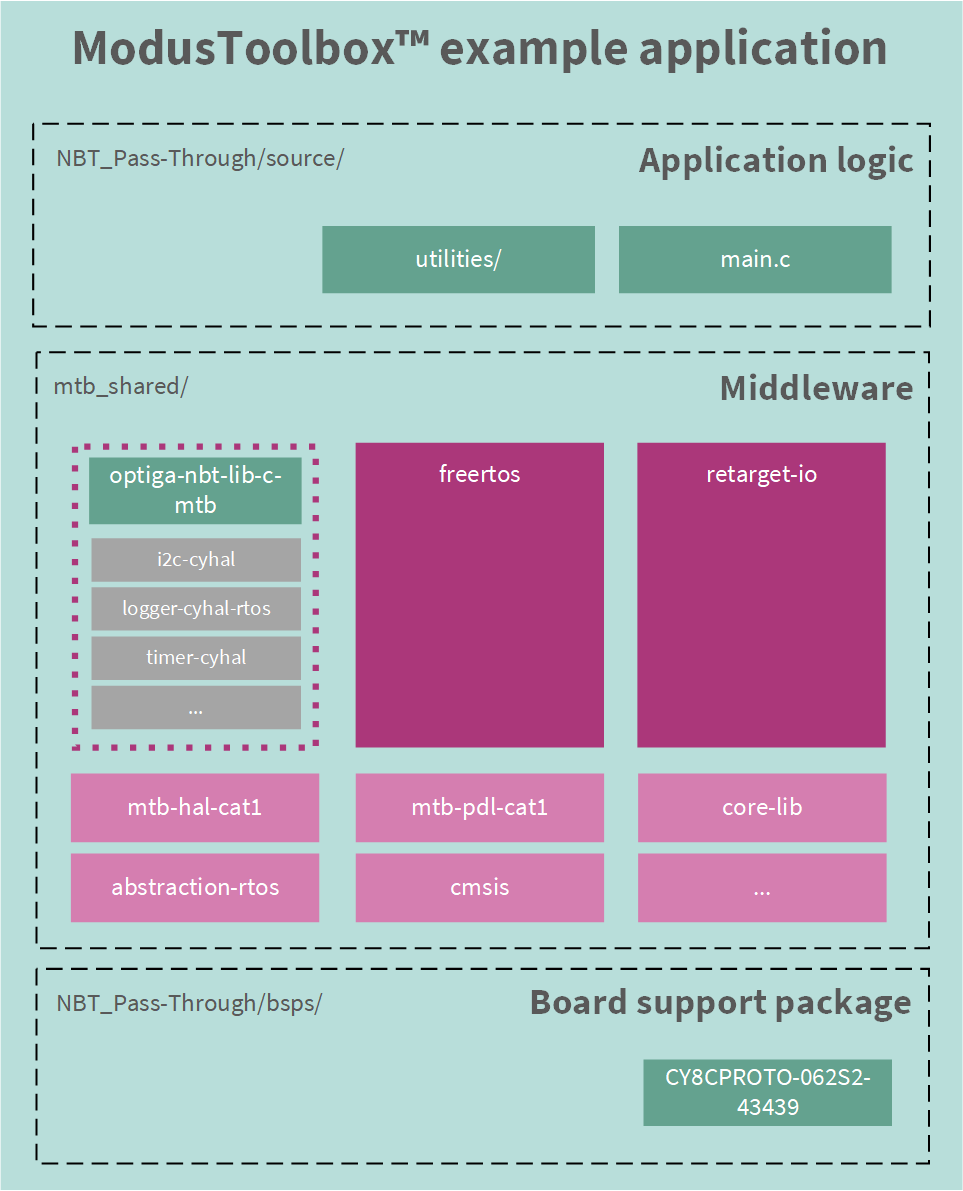
Fig. 94 High-level software architecture of the embedded application.
As depicted in Fig. 94, the application consists of the application logic, a number of
middleware libraries and a host-board specific board support package.
The required middleware libraries are specified as direct
dependencies in the deps folder. Indirect dependencies are resolved
during the build process and stated in the libs folder. The libraries
are then downloaded and stored in a dedicated folder outside the application
(mtb_shared), to enable reuse among multiple projects.
Among other middleware libraries available in ModusToolbox™, the application
utilizes the OPTIGA™ Authenticate NBT Host Library for ModusToolbox™. In addition to the
platform-independent host library for C, this middleware also
includes an implementation of the library’s platform abstraction layer (PAL) for
ModusToolbox™ MCUs. In ModusToolbox™ the library is included in the application
via the mtb_shared/optiga-nbt-lib-c-mtb folder.
Components
Embedded Application
Implements the PT use case logic in
main.c.Manages FreeRTOS tasks for multitasking and periodic operations.
Middleware Libraries
OPTIGA™ Authenticate NBT Host Library: APIs for PT commands and file operations.
FreeRTOS: Real-time OS for task management and synchronization.
Retarget IO: Debugging and logging support.
Utilities: Helper functions for the application.
Platform Abstraction Layer (PAL)
I2C-CyHAL: I2C communication via Cypress HAL.
Timer-CyHAL: Timer functionality via Cypress HAL.
Logger-CyHAL-RTOS: RTOS-based logging.
Logger-Printf: Basic logging using
printf.
OPTIGA™ Authenticate NBT Device
I2C Interface: Handles PT commands and communication with the host.
Application flow
This embedded application is designed to run on the OPTIGA™ Authenticate NBT Development Kit’s PSOC™ MCU. The application controls an LED on the host board, depending on the data transferred to the OPTIGA™ Authenticate NBT via NFC using a mobile phone. As the application makes use of the device’s pass-through (PT) functionality, the custom APDUs are transferred between the mobile phone and the host MCU to control the LED of the host board. The IRQ line of the development shield is used to signalize to the host MCU that a new command is available - to react accordingly.
On startup, the OPTIGA™ Authenticate NBT abstraction will be set up before
starting the FreeRTOS. Once the abstraction is ready, the nbt_pt_task
(in the main.c
file) configures the OPTIGA™ Authenticate NBT and starts the application logic.
The nbt_pt_task will:
Configure the OPTIGA™ Authenticate NBT for the host parameterization via PT use case (via
nbt_configure_pt()).Wait for the NBT to raise an interrupt, to signalize that pass-through data is available.
Fetch the pass-through APDU
nbt_get_passthrough_apdu()Handle the pass-through APDU according the the desired use case (
apdu_handler()). This function implements a state machine, performing certain processing steps, depending on the received APDU (e.g., enable disable LED, respond to SELECT command).Send the response to the APDU back to the NBT (via
nbt_set_passthrough_response()).Wait until new PT data is received by the NBT (Step 2).
Personalization
In order to assure that the OPTIGA™ Authenticate NBT device is correctly
personalized for this use case, the embedded application also performs a basic
personalization routine. Before the application enters its working loop, it
calls the nbt_configure_pt() function. This function defines the target
configuration and calls nbt_configure() from nbt-utilities.c to apply
the configuration to the OPTIGA™ Authenticate NBT device. nbt_configure()
applies the desired file access policies after selecting the NBT’s Type-4-Tag
application. And applies the interface configurations after selecting the NBT’s
onfigurator application.
Finally, to also apply the configuration on the OPTIGA™ Authenticate NBT,
ifx_t1prime_s_por() is called to perform a software reset via this
proprietary command.
FreeRTOS tasks
The application runs the following tasks. They are created in the main() function during the initialization of the NBT abstraction. The scheduler is started right afterwards.
FreeRTOS tasks |
Description |
Priority |
|---|---|---|
nbt_pt_task |
Main task of the Pt use case |
6 |
prvTimerTask |
Timer task (for timer service) |
3 |
logger_cyhal_rtos_task |
Logging task |
0 |
IDLE |
Idle task |
0 |
The
nbt_pt_taskhas the highest priority (6) since it is responsible for executing the main application logic of the PT use case.The
prvTimerTaskis used to handle the timer service and has a lower priority (3) to allow the main task to run without delays.The
logger_cyhal_rtos_taskis used for logging and has the lowest priority (0) to ensure that it does not interfere with the main application logic.The
IDLEtask is the default FreeRTOS idle task, which runs when no other tasks are ready to run, and also has the lowest priority (0).
Application details
This section provides an overview of the application details, including the main components and their interactions.
Project layout
The project is structured as a standard ModusToolbox™ project. The directory structure of the project, including the most important folders and files is shown in the following listing:
├── configs/                         # Configuration files for the project
│   └── FreeRTOSConfig.h             # FreeRTOS configuration header
├── deps/                            # Dependencies for the project
├── images/                          # Images for the project
└── source/                          # Source code for the project
    ├── utilities/                   # Utility functions for the project
    └── main.c                       # Main application logic
├── .cyignore                        # Cypress-specific ignore file
├── LICENSE                          # License file
├── Makefile                         # Top-level makefile for building the project
└── README.md                        # Project documentation and setup instructions
The main application logic is located in source/ folder. The middleware and
library modules are included in the project as dependencies (deps/ folder).
The dependencies are managed by the ModusToolbox™ build system and are
automatically downloaded and included in the project during the build
process. They are stored in the mtb_shared/ folder, which contains the
dependencies and libraries required for the project, including the
OPTIGA™ Authenticate NBT Host Library for ModusToolbox™.
The project also includes a number of configuration files, which are
necessary for the build process and the application logic. The
configs/ folder contains the FreeRTOS configuration file
(FreeRTOSConfig.h) and the Makefile is used to build the project.
Integration of the C host library
This application includes the OPTIGA™ Authenticate NBT Host Library for ModusToolbox™. This is a dedicated version of the OPTIGA™ Authenticate NBT Host Library for C tailored to work with the ModusToolbox™ build system and includes the necessary platform abstraction layer (PAL) implementations for the supported MCUs.
In ModusToolbox™, the library is included to the project as dependency
(deps/optiga-nbt-lib-c-mtb.mtb) and is automatically downloaded and
included in the project during the build process.
Afterwards, to use the modules of the library can be used by including the header files in the application code. For example, to use the OPTIGA™ Authenticate NBT Host Library in the application, you can include the header file as follows:
#include "infineon/nbt-apdu.h"
#include "infineon/nbt-cmd-config.h"
#include "infineon/nbt-cmd.h"
During initialization of the device abstraction, the platform-dependent implementations are assigned accordingly.
ifx_t1prime_initialize(&communication_protocol, &driver_adapter);
...
ifx_protocol_activate(&communication_protocol, &atpo, &atpo_len);
Afterwards, the command abstraction can be used to interact with the device via I2C (e.g., to select an application, read a file or write a file).
PAL implementation
The OPTIGA™ Authenticate NBT Host Library for
ModusToolbox™
includes implementations of the PAL for the C host library. These
platform-specific implementations are located in the
mtb_shared/optiga-nbt-lib-c-mtb/release-vX.X.X/nbt-mtb folder. The
implementations are built on the generic cyhal-layer, an abstraction
available for many ModusToolbox™-supported MCUs or FreeRTOS
functionality.
Implementation |
Description |
|---|---|
i2c-cyhal |
I2C interface implementation based on the Cypress HAL |
logger-cyhal-rtos |
Additional logger layer, wrapping the logging function into an RTOS task |
logger-printf |
Logger implementation, based on printf |
timer-cyhal |
Timer implementation, based on the Cypress HAL |
timer-freertos |
Timer implementation, based on the FreeRTOS timers |
Pass-through interrupt
The NBT’s interrupt line is connected to the PSOC™ MCU’s pin P6_2.
The MCU is configured to trigger an interrupt when the NBT raises an IRQ
signal.
The function nbt_irq() is called when the interrupt is triggered.
It provides an xSemaphore to tasks waiting for that interrupt.
As the interrupt is used to handle both, I2C communication and pass-through data, the semaphore may be consumed either by the nbt_t1prime_irq() function or the nbt_pt_task().
As in this use case all I2C communication is happening after pass-through data was transmitted the functions are not simultaneously waiting for the semaphore.