Personalization
In order to evaluate the device in this use case it first needs to be configured accordingly, this is done during the personalization phase. See the OPTIGA™ Authenticate NBT Pass-Through Use Case Guide for more information about the general procedure.
The personalization can be performed via both, I2C and NFC. For the evaluation of this use case, there exists an example configuration (see Target configuration). Either, the NBT Personalization mobile phone app or the NBT Pass-Through embedded application can be used to personalize the device for the PT evaluation.
System architecture
This section shows the system architecture for the personalization, and the differences between the two interfaces.
Hardware
For personalization via NFC, the development shield may be used standalone and does not need to be attached to the host MCU board (although it can). An Android or iOS mobile phone with NFC capability is required to perform the personalization.
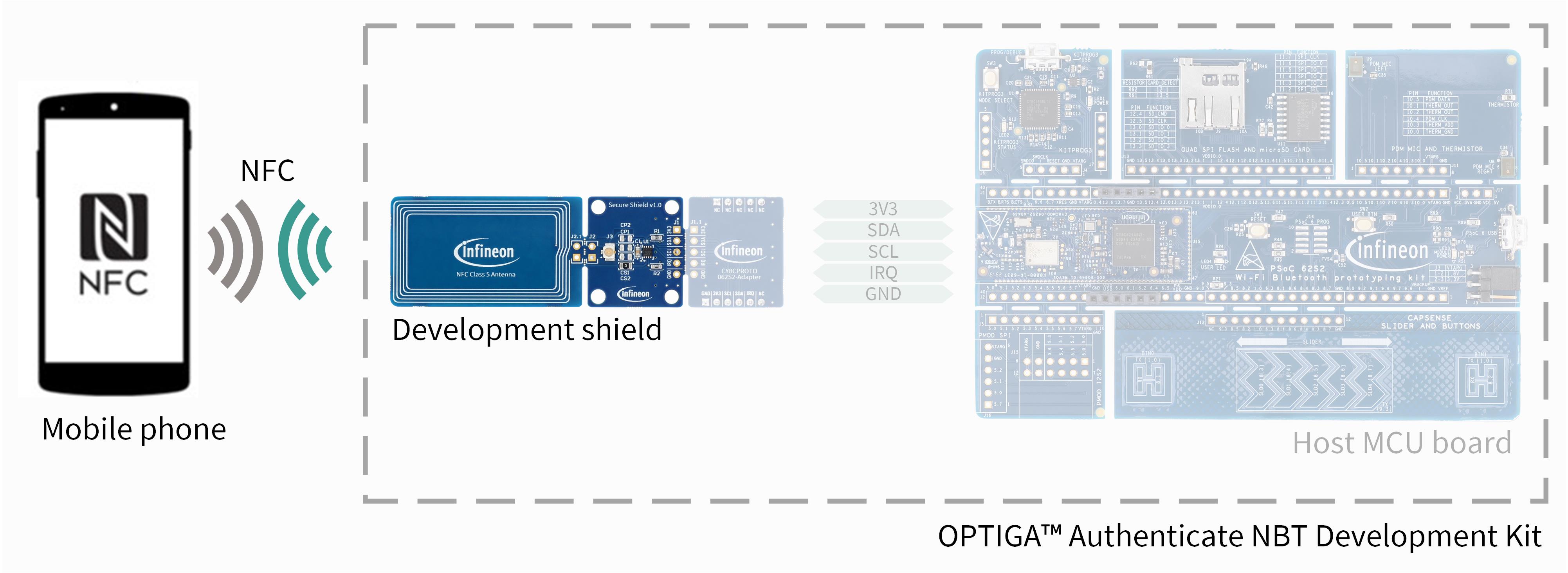
Fig. 81 Hardware components for personalization via NFC.
For personalization via I2C, the development shield needs to be attached to the pre-soldered pin sockets of the host MCU board. This connects the power supply (3V3, GND) and the I2C pins (SDA, SCL). Even tough the IRQ pin is connected, it is not actively utilized in this use case’s example applications.
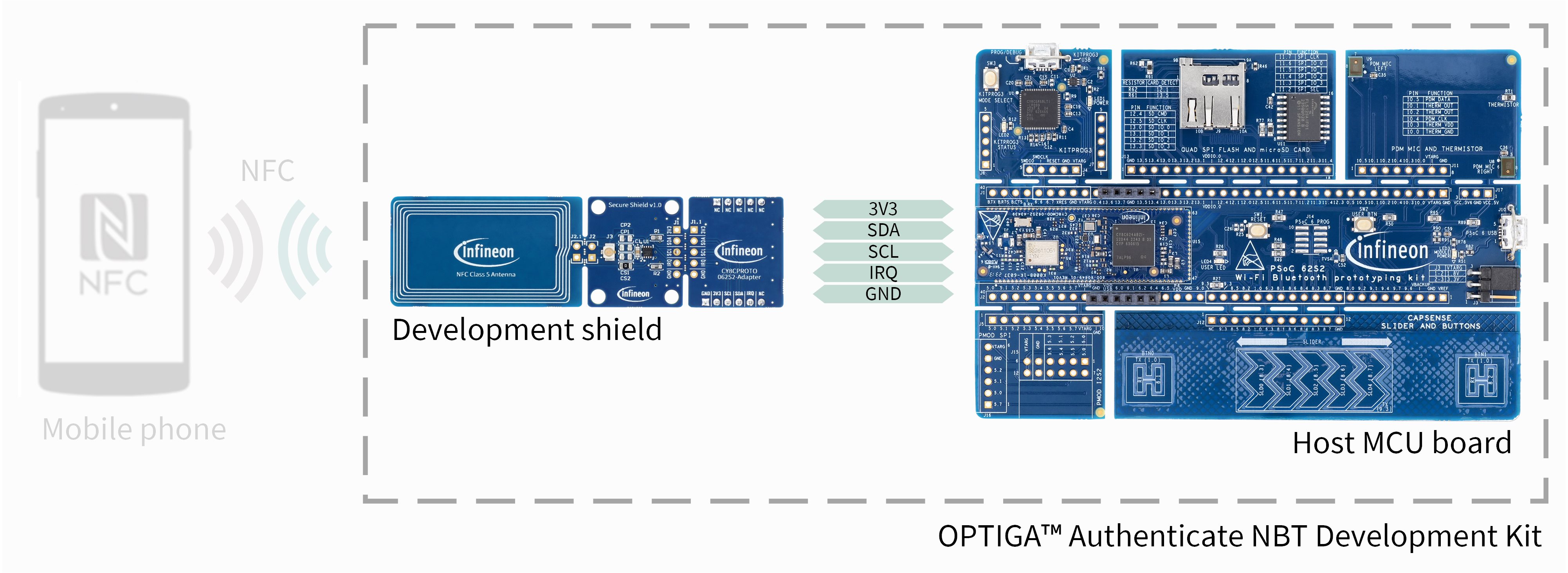
Fig. 82 Hardware components for personalization via I2C.
Software
The dedicated NBT Personalization mobile phone app (Android or iOS) can be used to personalize the device via NFC. In this application, the PT use case can be selected to personalize the device for the PT use case.
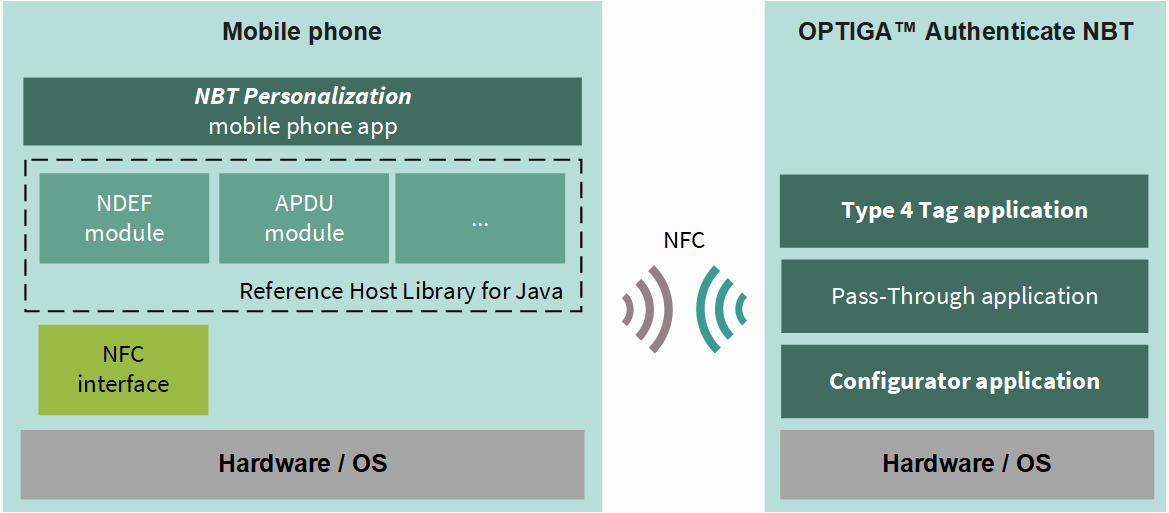
Fig. 83 Software architecture of the included applications for the personalization via NFC.
The NBT Asynchronous Data Transfer embedded application can also be used to personalize the device via I2C. This application does a personalization routine during its initialization phase, before the operational loop is started.
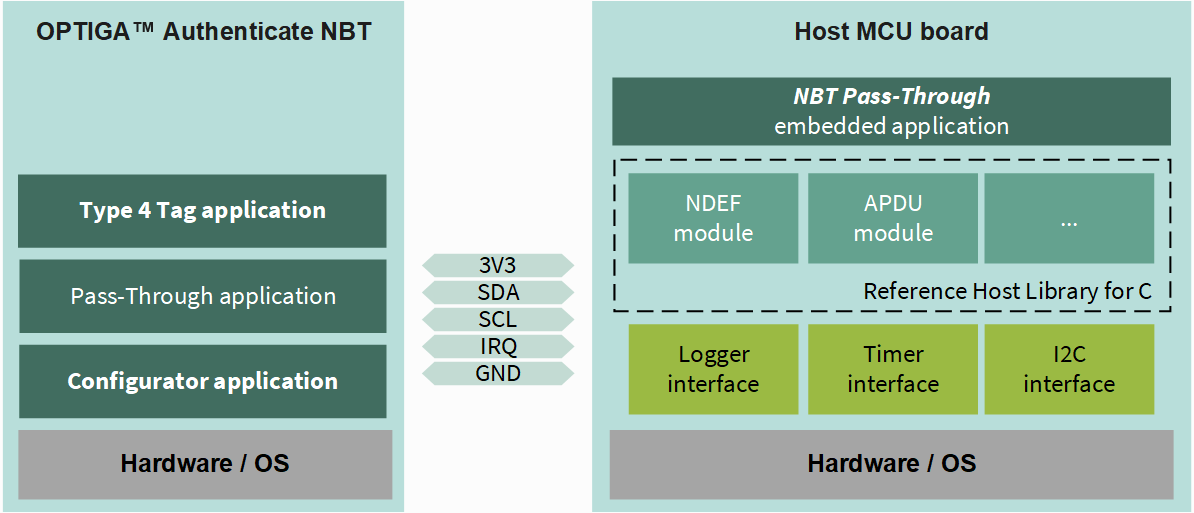
Fig. 84 Software architecture of the included applications for the personalization via I2C.
The NBT Personalization mobile phone app and the NBT Asynchronous Data Transfer embedded application are shared as source code and contain the personalization logic. The applications running on the OPTIGA Authenticate NBT are considered on-chip software, pre-flashed to the device and not alterable.
The personalization flow utilizes the Configurator applicaiton and the Type 4 Tag application of the OPTIGA™ Authenticate NBT’s on-chip applications. Refer to the extended datasheet for more information about the on-chip applications.
Personalization flow
The personalization flow is similar for both, NFC and I2C. This section describes the personalization flow for both interfaces and their differences.
Via NFC
The NBT Personalization mobile phone app personalizes the device via NFC.
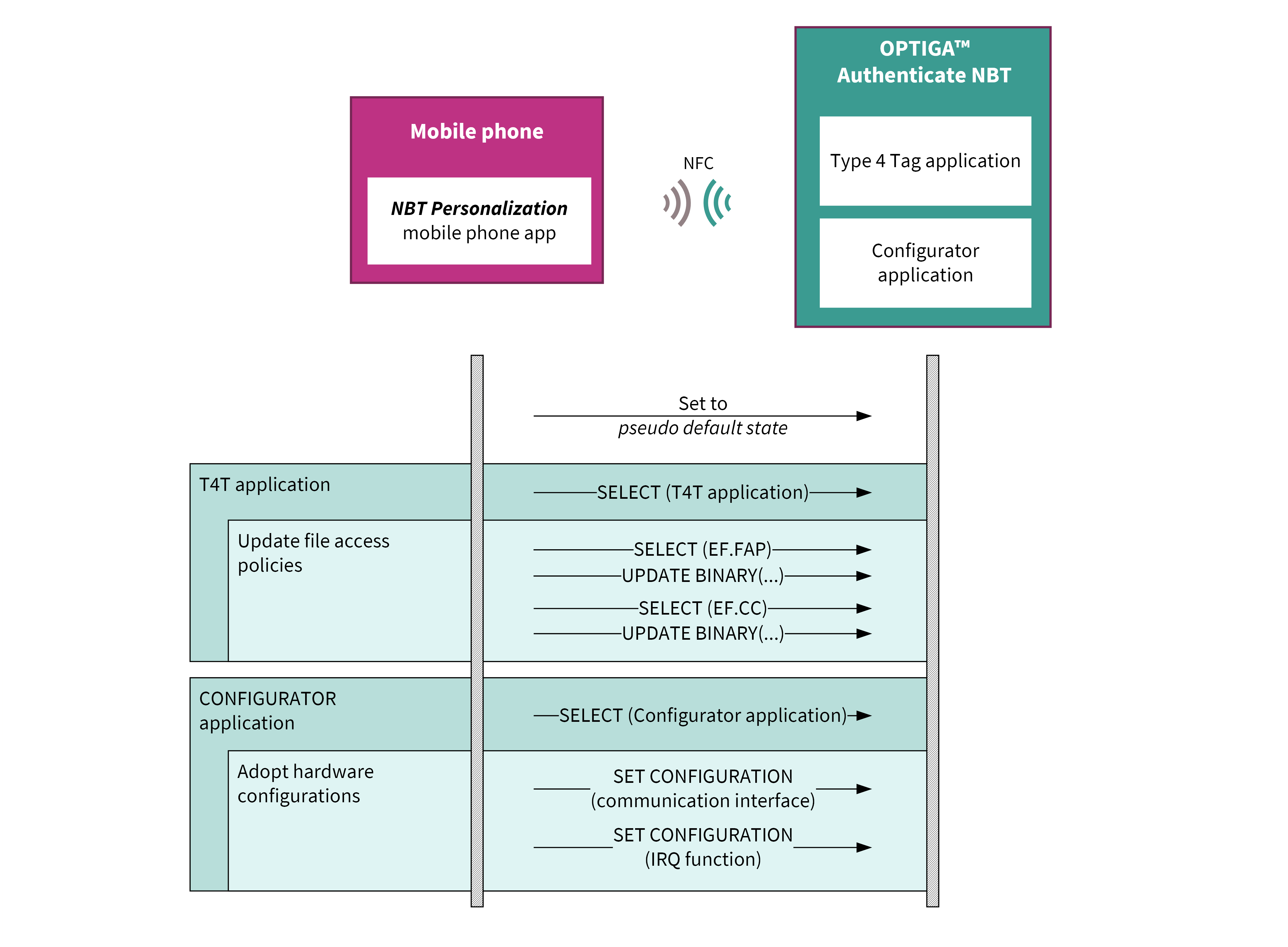
Fig. 85 Flow diagram for personalizing the OPTIGA™ Authenticate NBT for this example application.
The mobile phone app sets the device to a pseudo default state before performing the use-case-specific personalization. During this step, the NDEF file’s content is cleared and the file access policies are set to the default values. The content of the proprietary files is not touched.
Via I2C
The NBT Asynchronous Data Transfer embedded application personalizes the device via I2C.
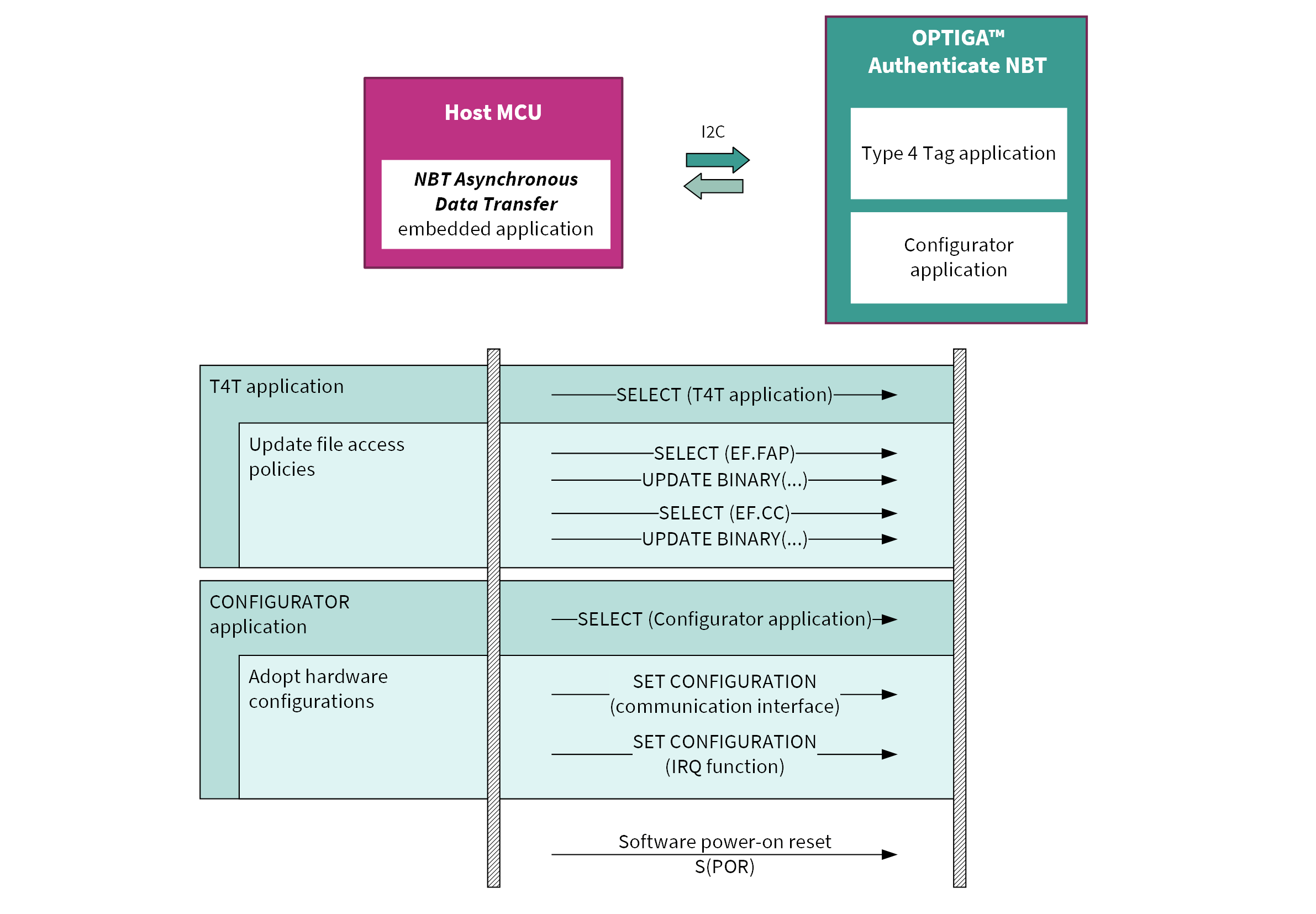
Fig. 86 Flow diagram for personalizing the OPTIGA™ Authenticate NBT for this example application.
As seen in the flow, the embedded application does not reset the device to its default state first. Thus, the application does not modify any file contents. Only the file access polices and the Interface settings are set.
Target configuration
Describes which settings of the OPTIGA™ Authenticate NBT are altered during the personalization phase (based on the device’s default state).
T4T file access policy
File |
I2C_Read |
I2C_Update |
NFC_Read |
NFC_Update |
|---|---|---|---|---|
FAP_FILE |
✓ |
✓ |
✓ |
✓ |
CC_FILE |
✓ |
✗ |
✓ |
✗ |
NDEF_FILE |
✓ |
✓ |
✓ |
✗ |
PP1_FILE |
✗ |
✗ |
✗ |
✗ |
PP2_FILE |
✗ |
✗ |
✗ |
✗ |
PP3_FILE |
✗ |
✗ |
✗ |
✗ |
PP4_FILE |
✗ |
✗ |
✗ |
✗ |
The CC_FILE is updated accordingly to reflect the permission settings. In order to allow this operation the permission to update the CC_FILE needs to be temporary granted.
Interface settings
Interface |
Setting |
|---|---|
I2C |
Enabled |
NFC |
Enabled |
IRQ function |
PT-IRQ |
Setting the interrupt to PT-IRQ, the interrupt is either triggered
if new pass-through data is available or if earlier requested data is
ready via the I2C interface.
NDEF file content
Even though the file access policy allows access to the NDEF_FILE via I2C, any content of the file is deleted during personalization.