 |
mtb-pmbus 1.4.0.2051
|

|
|
mtb-pmbus 1.4.0.2051
|
|
The PMBus middleware has its own build into the Device Configurator specialized graphical user interface (GUI) that combines all middleware-related logical and physical layer settings in one place.
To create middleware instance configuration, add the PMBus instance on the Solutions tab in the Device Configurator.
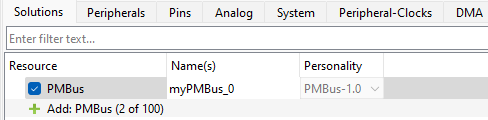
Each PMBus instance includes the following configuration groups:
Note: By default, the project uses the compile-time options generated by the Device Configurator and solution personality. For alternative manual configuration, refer to the mtb_pmbus_conf.h file description in Add SMBus/PMBus code to your project.
To migrate an existing project from manual PMBus configuration to a Solution Personality:
MTB_PMBUS_MANUAL_CONFIG from the project defines.First, initialize the hardware resources for the PMBus middleware without enabling it. The middleware determines when to enable the hardware resources. For this purpose, provide the following callbacks:
mtb_pmbus_stc_config_hw_t::hw_resource_ctrl_callbackmtb_pmbus_stc_config_hw_t::enable_hw_irq_callbackmtb_pmbus_stc_config_hw_t::disable_hw_irq_callbackAfter the hardware resources are initialized, call the mtb_pmbus_init function. After initialization, you can update the default configuration of the middleware:
Note: The
mtb_pmbus_initfunction must be called before any other target APIs to initialize the instance structure. A call to the other APIs before the init function can lead to unexpected behavior including a hard fault error.
After completing the initial configuration, call the mtb_pmbus_enable function. After calling mtb_pmbus_enable, the middleware starts responding on the bus.
The contents of the mtb_pmbus_stc_config_hw_t, mtb_pmbus_stc_config_t, and mtb_pmbus_stc_config_cmd_t structures are not modified by the middleware, so they can be allocated in flash or RAM as needed. However, these structures must remain available for as long as the PMBus instance is active, and their contents are expected to remain unchanged after calling mtb_pmbus_init.
The contents of mtb_pmbus_stc_t are internal and not subject to modification by the application. The mtb_pmbus_stc_t structure is continuously updated by the middleware and therefore must be located in RAM.
mtb_pmbus_enable can only be called after mtb_pmbus_init.
The middleware does not provide a deinit function. To update the configuration, use the following sequence:
mtb_pmbus_disablemtb_pmbus_initmtb_pmbus_enableThe PMBus middleware does not deinitialize the target hardware resources. If the PMBus target instance is disabled and no longer required, the application is responsible for releasing the hardware resources.
The PMBus middleware manages the controller hardware-resource initialization through callbacks. The application does not initialize hardware resources manually before calling mtb_pmbus_ctrl_init. Instead, provide the following callbacks:
mtb_pmbus_ctrl_cfg_t::callback_hw - for hardware initialization, enabling, and disablingmtb_pmbus_ctrl_cfg_t::callback_isr_enable - for enabling interruptsmtb_pmbus_ctrl_cfg_t::callback_isr_disable - for disabling interruptsWhen mtb_pmbus_ctrl_init is called, it automatically invokes mtb_pmbus_ctrl_cfg_t::callback_hw with the MTB_PMBUS_CTRL_HW_RESOURCES_INIT event to initialize the hardware resources. The application will implement the hardware initialization code in this callback handler.
Note: The
mtb_pmbus_ctrl_initfunction must be called before any other controller APIs to initialize the instance structure. A call to the other APIs before the init function can lead to unexpected behavior including a hard fault error.
After completing the initial configuration, call the mtb_pmbus_ctrl_enable function. After calling mtb_pmbus_ctrl_enable, the controller is ready to initiate transfers on the bus.
The contents of the mtb_pmbus_ctrl_cfg_t and mtb_pmbus_ctrl_stc_config_hal_t structures are not modified by the middleware, so they can be allocated in flash or RAM as needed. However, these structures must remain available for as long as the PMBus controller instance is active, and their contents are expected to remain unchanged after calling mtb_pmbus_ctrl_init.
The contents of mtb_pmbus_ctrl_stc_t are internal and not subject to modification by the application. The mtb_pmbus_ctrl_stc_t structure is continuously updated by the middleware and therefore must be located in RAM.
mtb_pmbus_ctrl_enable can only be called after mtb_pmbus_ctrl_init.
The middleware does not provide a deinit function. To update the configuration, use the following sequence:
mtb_pmbus_ctrl_disablemtb_pmbus_ctrl_initmtb_pmbus_ctrl_enableThe PMBus middleware does not deinitialize the controller hardware resources. If the PMBus controller instance is disabled and no longer required, the application is responsible for releasing the hardware resources.